How to Apply Parwaaz Card as Applicant for an Interest-Free Loan – Complete Online Process [2026]
To offer overseas employment opportunities and build a better future, CM Punjab Maryam Nawaz launched the Parwaaz Card Program. This initiative will help youth to access foreign employment opportunities and cover pre-departure expenses by providing an interest-free loan. If you want to apply Parwaaz Card for an Interest-free loan, please check our comprehensive guide on “How to Apply Parwaaz Card as Applicant for an Interest-free Loan”.
Please Ensure the Following Documents to Apply Parwaaz Card as Applicant for an Interest-Free Loan
Important Instructions Before Starting the Application
Please ensure the following eligibility requirements before starting the Parwaaz Card online registration and application.
How to Apply Parwaaz Card as Applicant For an Interest-Free Loan
If you are an applicant who is interested in applying for an interest-free loan to cover your expenses, such as medical tests, air tickets, skills verification test, and other fees, please follow the step-by-step process on “How to Apply Parwaaz Card to register and apply as an applicant for an interest-free loan”:
Step 01: Account/Portal Registration
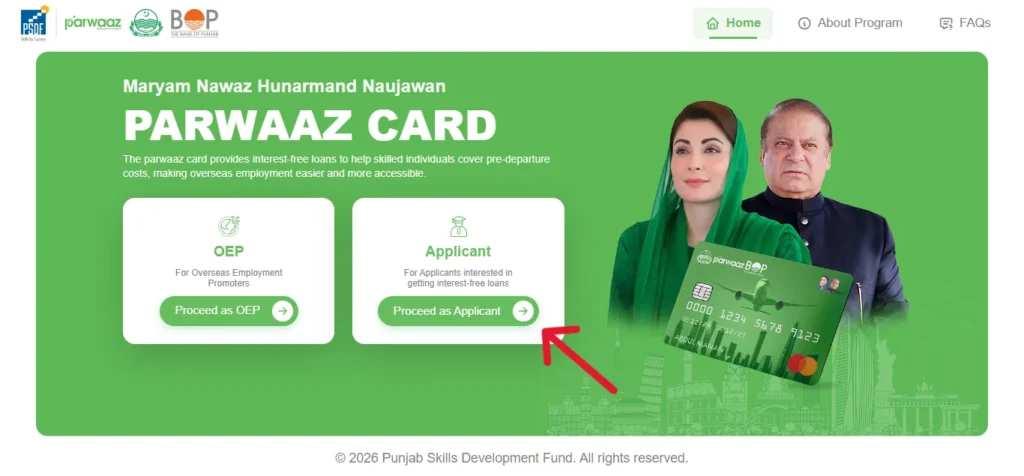
- Click on the “Apply As Applicant” button provided above or given below.
- Click on the “Proceed as Applicant” button. An applicant login page will open.
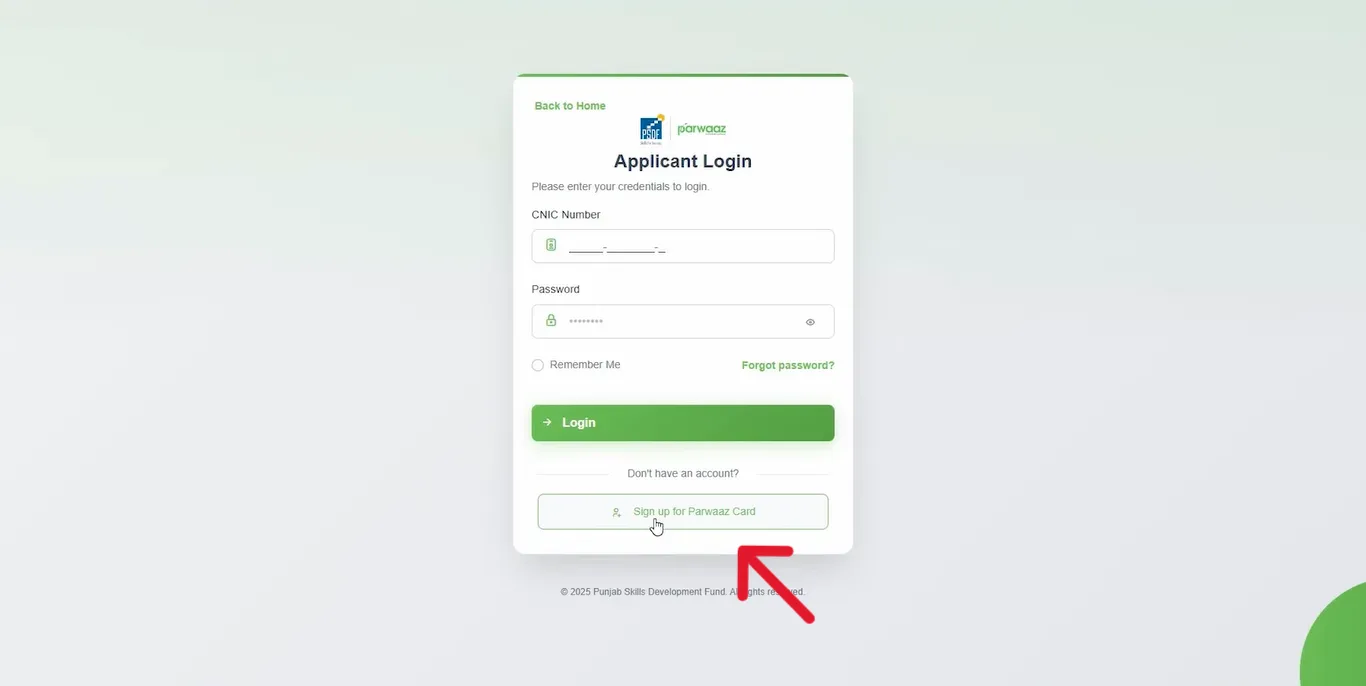
- Since we will sign up and create an account first, please click on the “Sign Up for Parwaaz Card” button at the bottom.
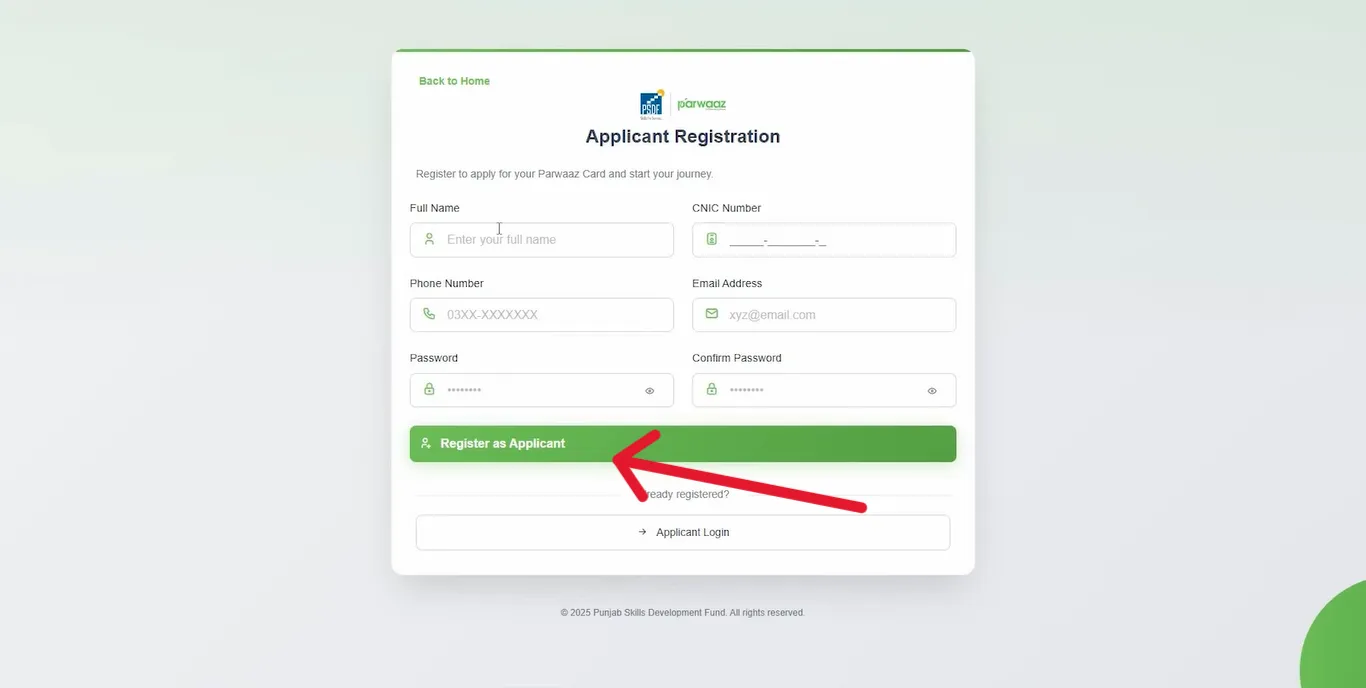
- The Applicant Registration page will open. On the registration page, enter your full name, CNIC number, phone number, email address, and a strong password.
- Re-enter the password and click on the “Register as Applicant” button at the bottom.
- You will receive an OTP on your provided phone number and email address. Enter the received OTP and verify your Parwaaz Card portal/account.
- Your Parwaaz Card portal/account is registered successfully.
- After registering an account/portal for Parwaaz Card, an application will open where the applicant provides his/her required details.
Step 02: Personal Details
- In the first section of Personal Details, the applicant will provide the required personal details.
- Personal Information: At first, the applicant will provide personal information. It includes title, full name, date of birth, and gender.
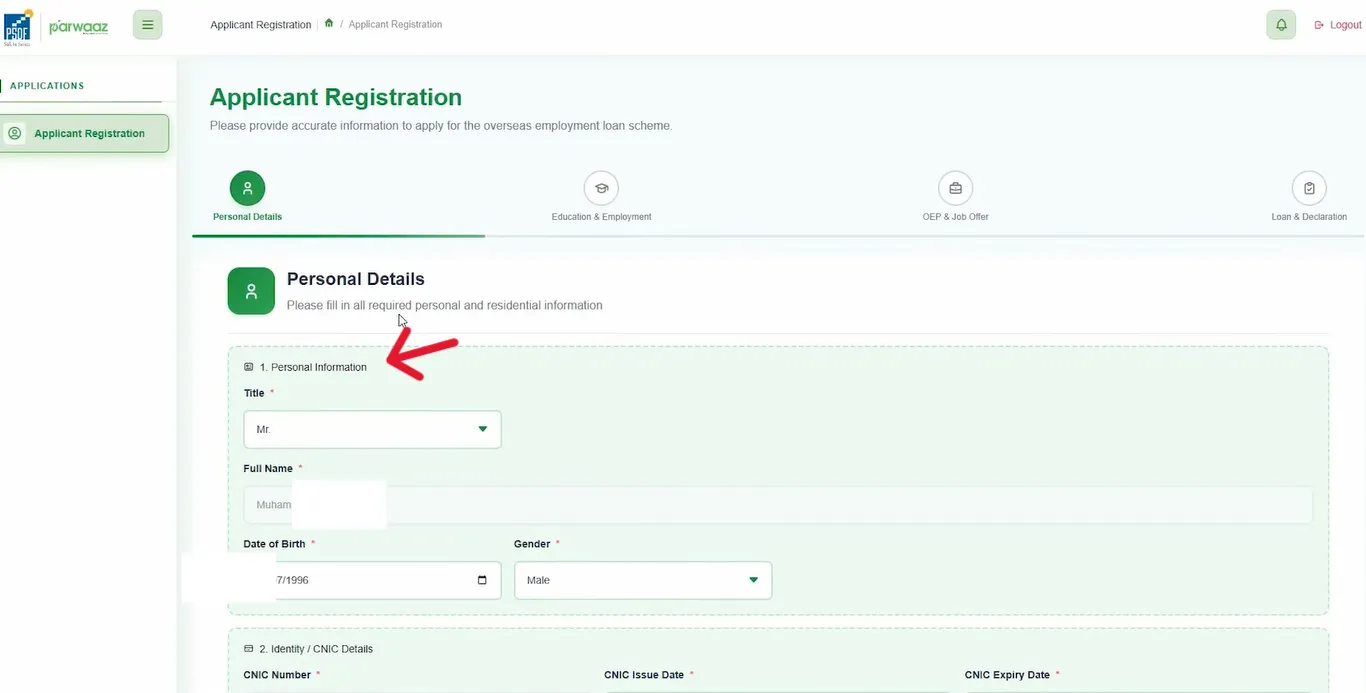
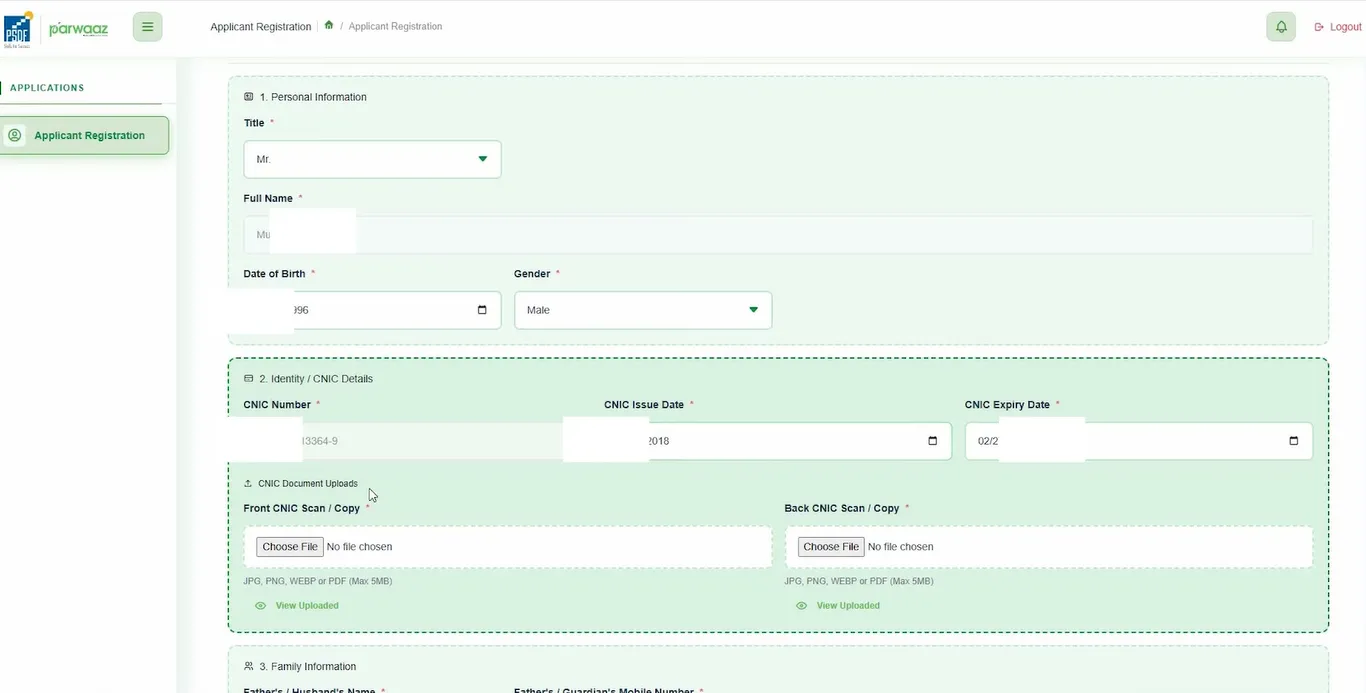
- CNIC/Identity Card Details: Next, the applicant will provide CNIC/National Identity Card details. These include CNIC number, CNIC issue date, and expiry date. Moreover, the applicant will upload the scanned images of the front and back sides of the CNIC/National Identity Card.
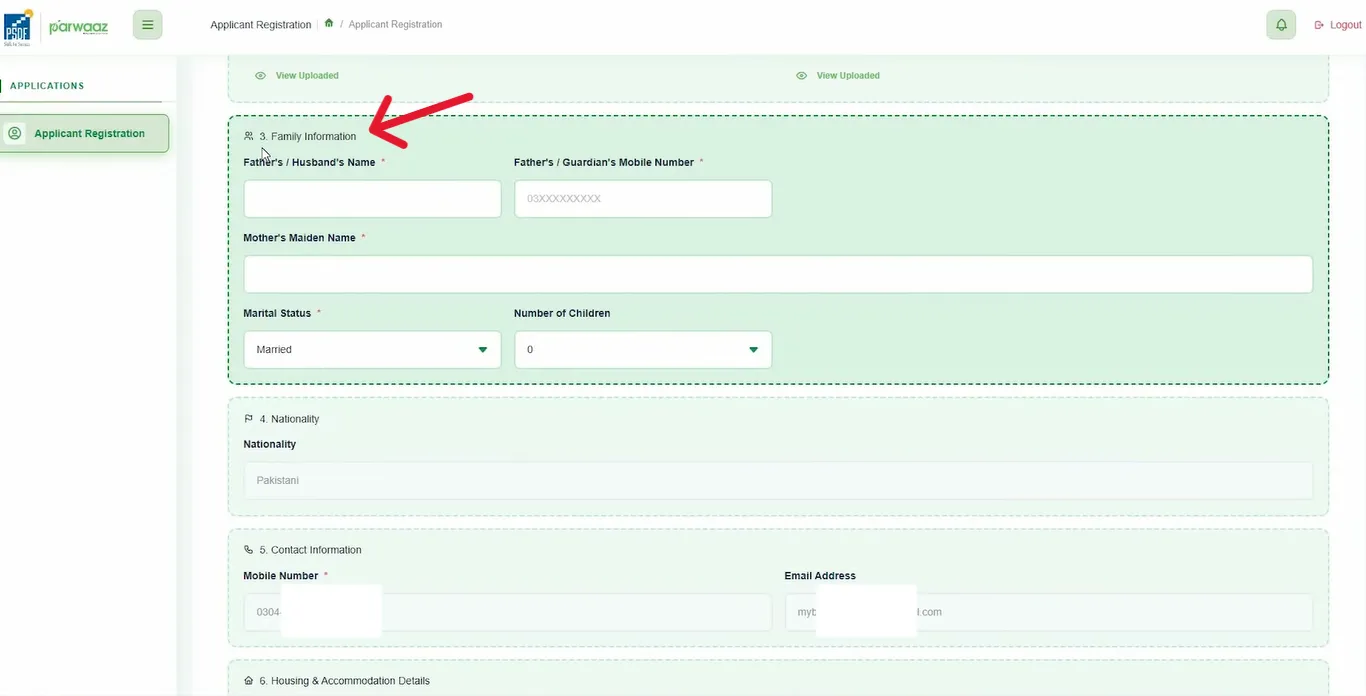
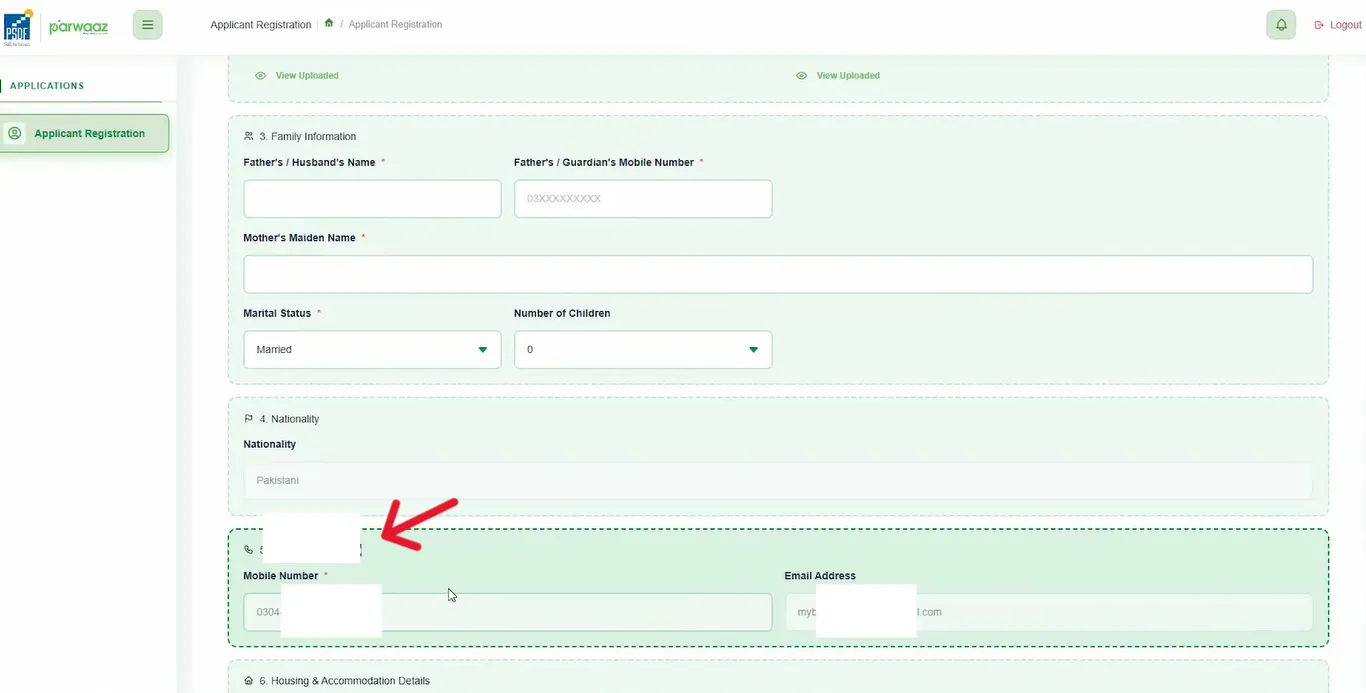
- Family Information: After providing CNIC details, the applicant will provide details about his/her family. It includes the father’s/husband’s/guardian’s name, mobile number, mother’s name, marital status, and number of children.
- Nationality: The applicant will select his/her nationality. However, it is selected automatically as only Pakistani nationals are eligible for this program.
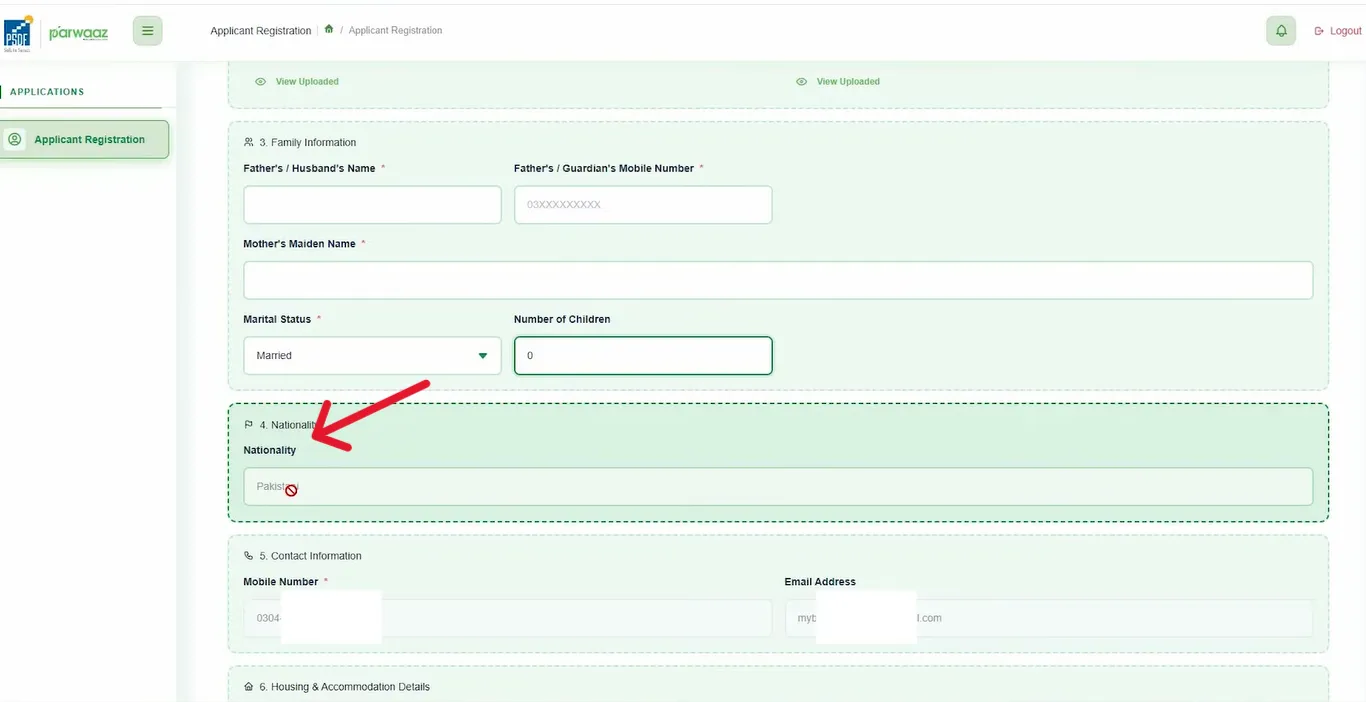
- Contact Information: The applicant will provide their mobile number and email address. However, it will be entered automatically as this information has already been provided during portal/account registration.
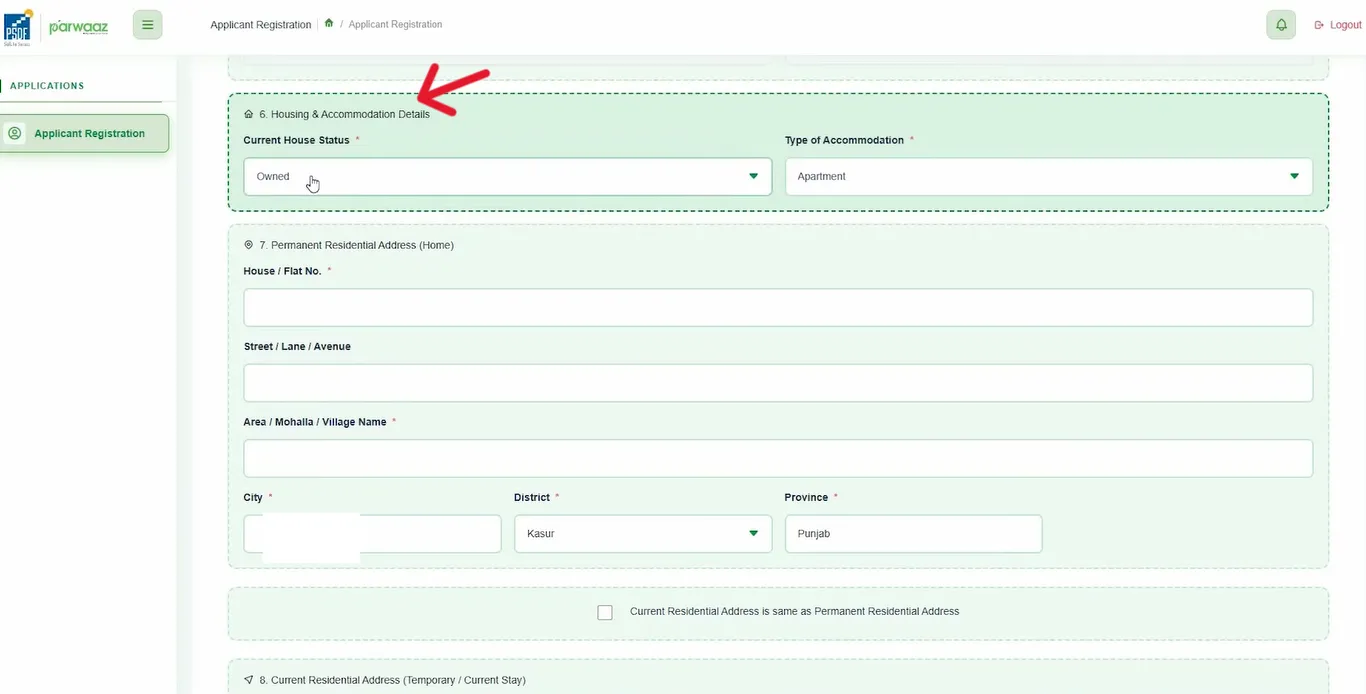
- House and Accommodation Details: The applicant will select their current house status, such as Rented, Owned, or Parent’s Company Provided. Next, the applicant will select the type of accommodation, whether it is an apartment, a portion, or a house.
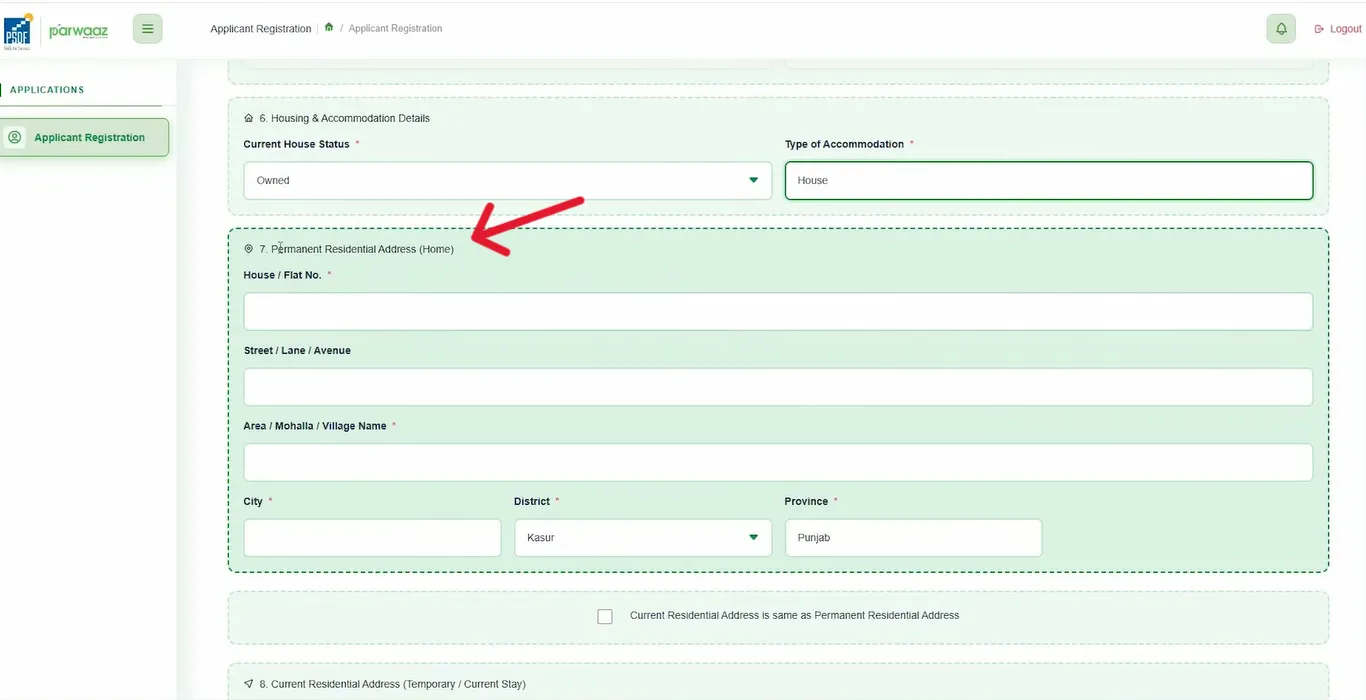
- Permanent Residential Address: The applicant will provide their complete house address with the selection of District, Tehsil, and Province. If the current is the same as permanent, also check the box provided at the bottom. If the current address is different, the applicant will enter the complete address.
- Click the “Save and Next” button at the bottom to save the provided information and move to the next section.
Step 02: Education and Employment
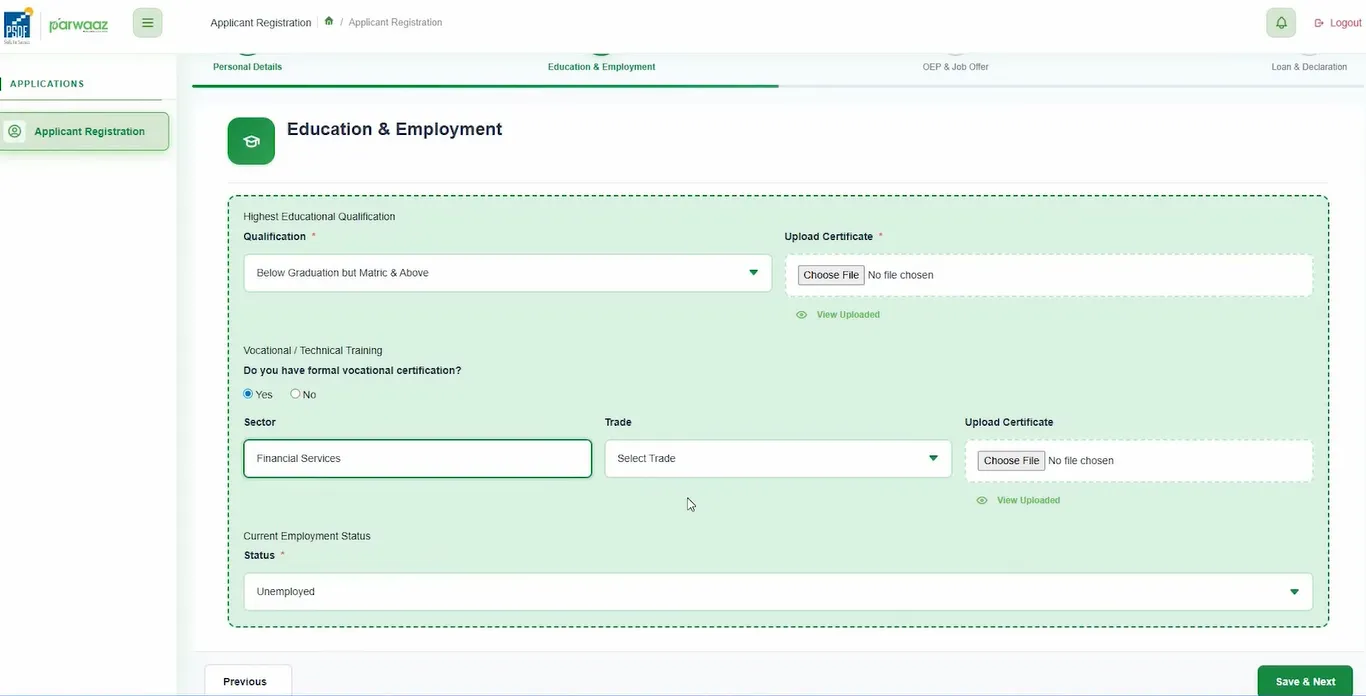
In this section, the applicant will provide their complete and accurate information about their education and employment status.
- Highest Educational Qualification: The applicant will provide details about their highest educational qualification. These details include the selection of their degree level, such as Below Matric, Graduation, Post Graduation, Above Matric but Under Graduation, or illiterate. If the applicant has any of the previously described education/qualifications, uploading the certificate is also necessary and required.
- Vocational/Technical Training: If the applicant has any vocational/technical training, he/she will also provide their details. It includes selecting the sector, trade, and uploading the certificate.
- Employment Status: The applicant will select his/her employment status, such as employed, non-employed, or self-employed.
- Click the “Save and Next” button to save the provided information and move to the next section.
Step 03: OEP & Job Offer
In this section, applicants will provide information about their overseas employment promoter (OEP) and job offer.
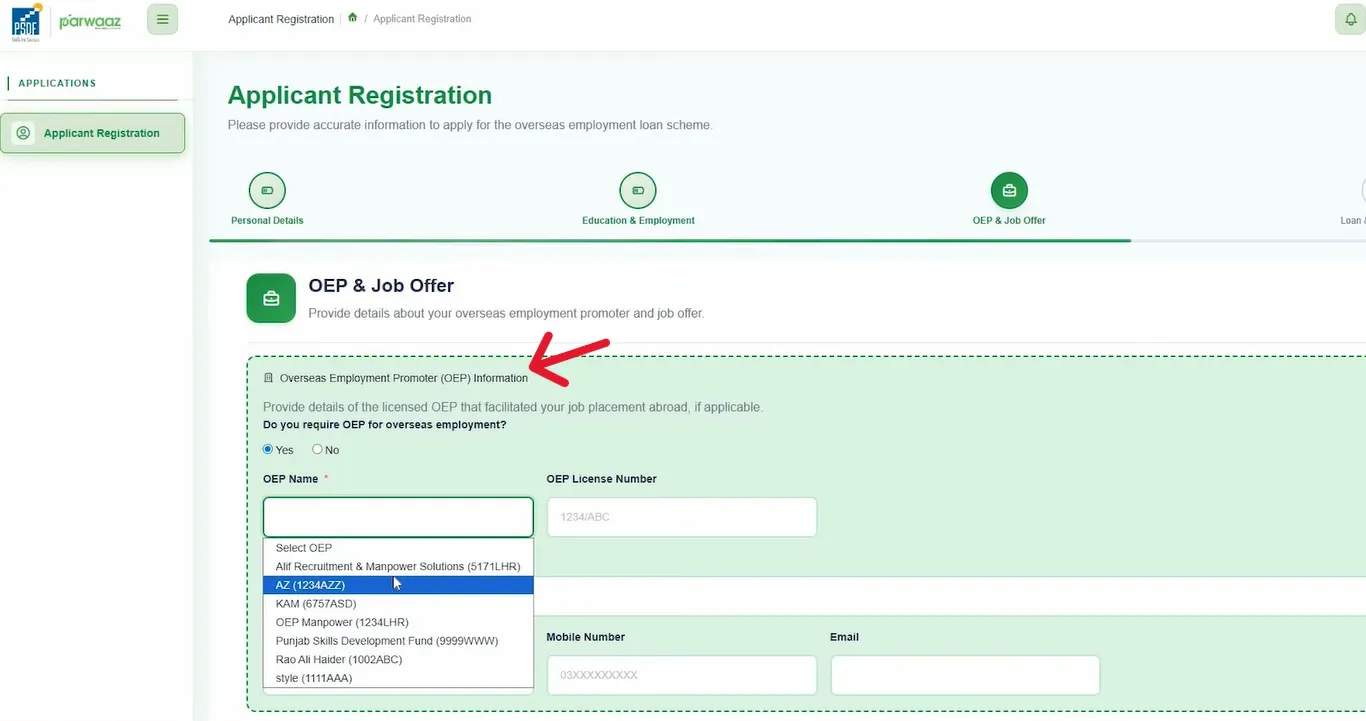
- Overseas Employment Promoter (OEP) Information: Applicants will select whether they require an Overseas Employment Promoter. If not, simply select ‘No’. If required, select ‘Yes’. If you selected ‘Yes’, then select the registered/licensed OEP, and provide details of the selected OEP.
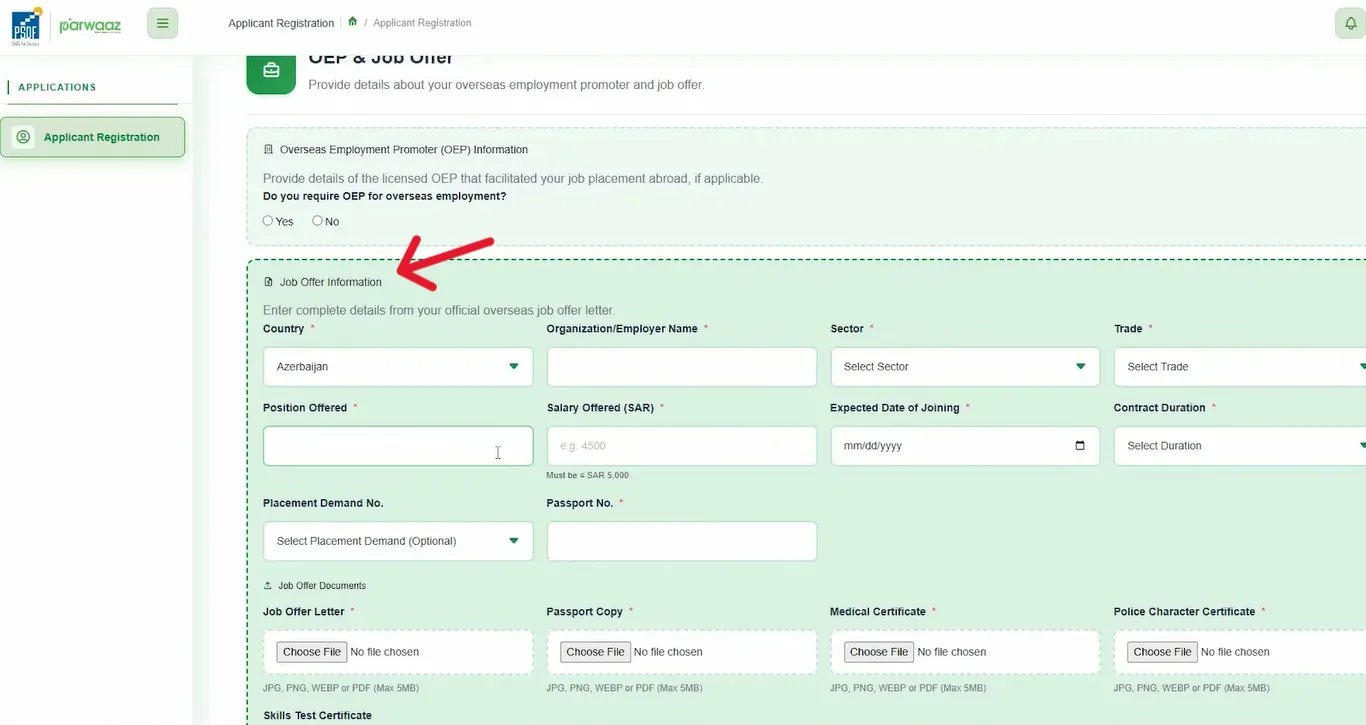
- Job Offer Information: The applicant will provide information from their official overseas job offer letter. This information includes country, employer name, sector, trade, position offered, salary offered, expected joining date, contract duration, placement demand number, and passport number.
- Job Offer Documents: The applicant will upload the following documents: Job Offer Letter, Passport Copy, Police Character Certificate, Medical Certificate, and Skill Test Certificate.
- Click “Save and Next” to save the provided information and navigate to the next section.
Step 04: Loan & Declaration
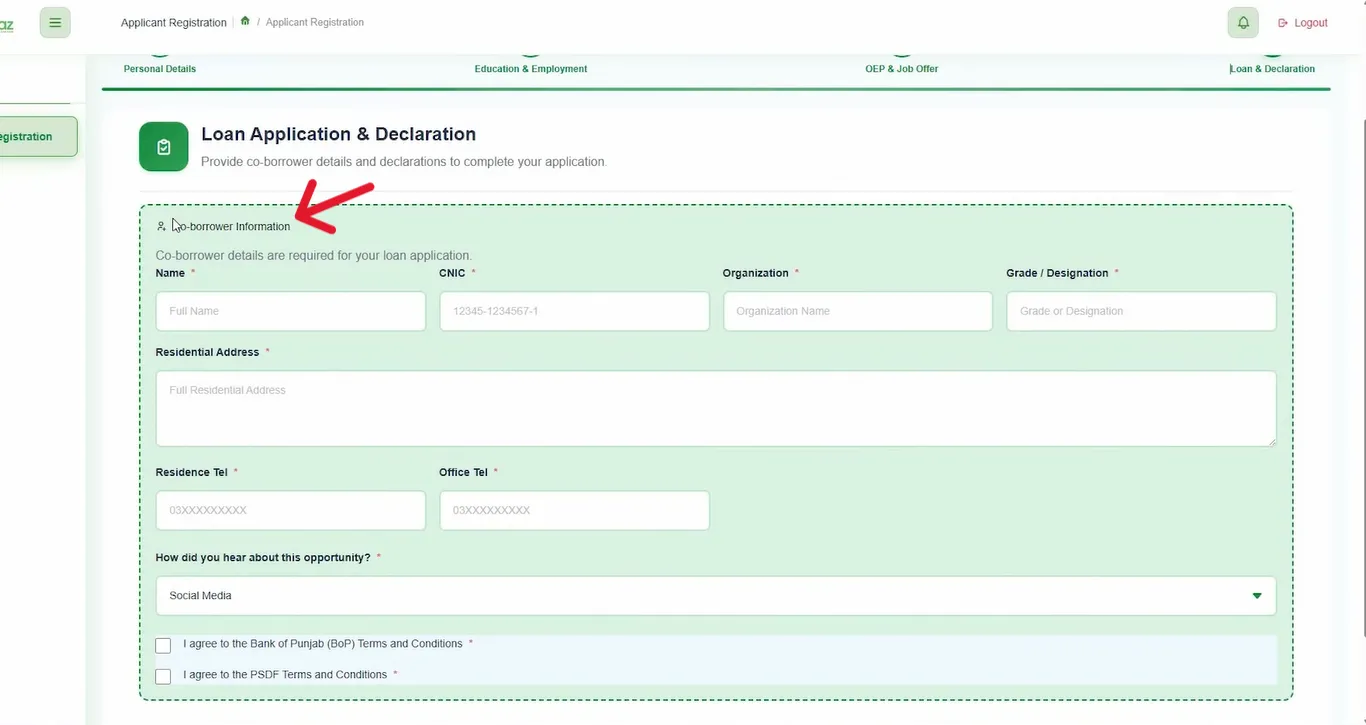
In the last section of “Loan Application and Declaration”, the applicant will provide the co-borrower details and declaration to complete the application for the Parwaaz Card.
- Co-Borrower Information: The applicant will provide information about the co-borrower. This includes the Co-Borrower’s name, CNIC number, Organization, Grade/Designation, Residential Address, Residential Telephone number, Office Telephone number, and opportunity source.
- Declaration: Read the Terms and Conditions of Bank of Punjab (BOP) as well as PSDF’s Terms and Conditions. Check the declaration boxes to agree.
- Click the “Submit Application” button at the bottom to successfully apply Parwaaz Card online.
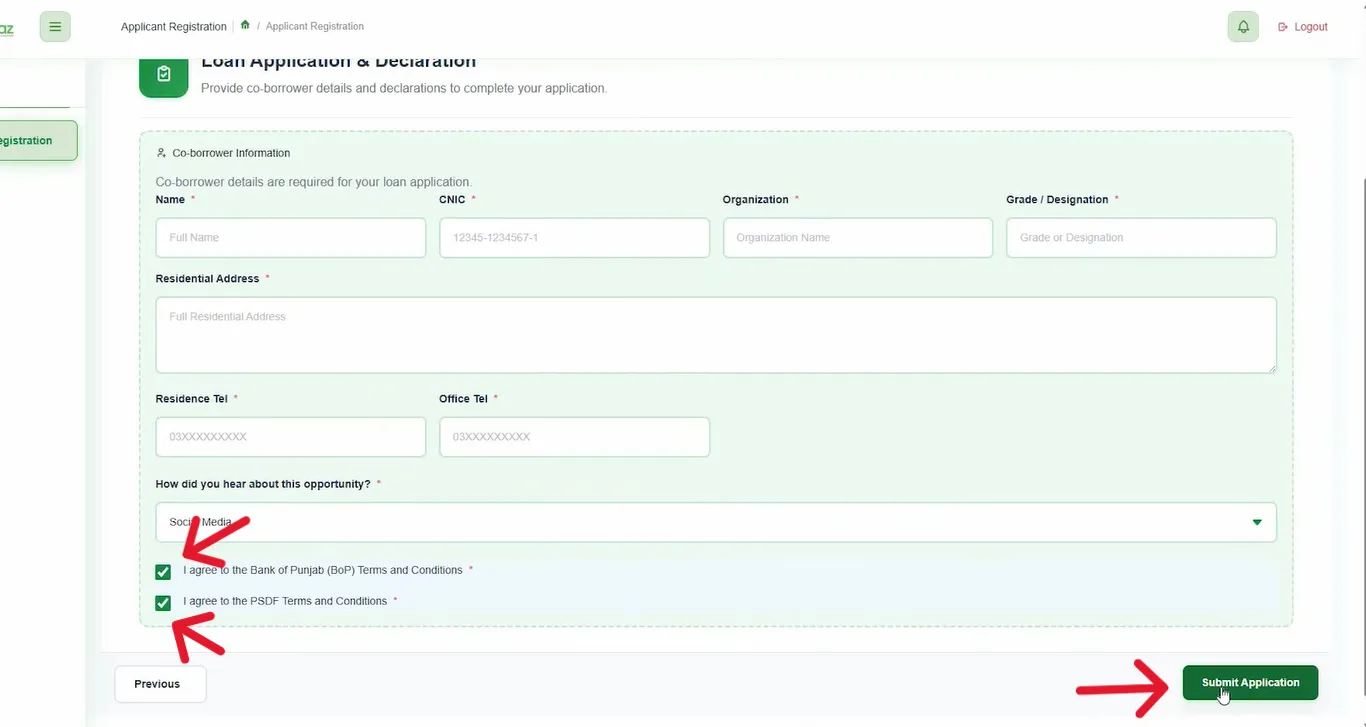
Note: Please review the application before submission and ensure you have provided the required details and uploaded all documents.
What Happens After Application Submission?
How to Check CM Punjab’s PSDF Parwaaz Card Application Status? (For Interest-free Loan Applicants)
If you are an applicant who has applied for an interest-free loan, you can check your application status by following the process:
Important Guidelines to Follow While Applying for Parwaaz Card Online
DO’s
DON’Ts
Helpline Number
1786
Frequently Asked Questions (FAQs)
![Apply Parwaaz Card as Applicant for an Interest-Free Loan [2026]](https://parwaazpsdf.org.pk/wp-content/uploads/2026/01/Punjab-Parwaaz-Card-Icon.webp)